AI Webtoon Scanlation Tool: Webtoon Translator Guide (2026)
Use an AI webtoon scanlation tool to translate webtoon strips. See what a webtoon translator automates, how to split chapters, costs, limits and rights.
 AI Manga Translator Team
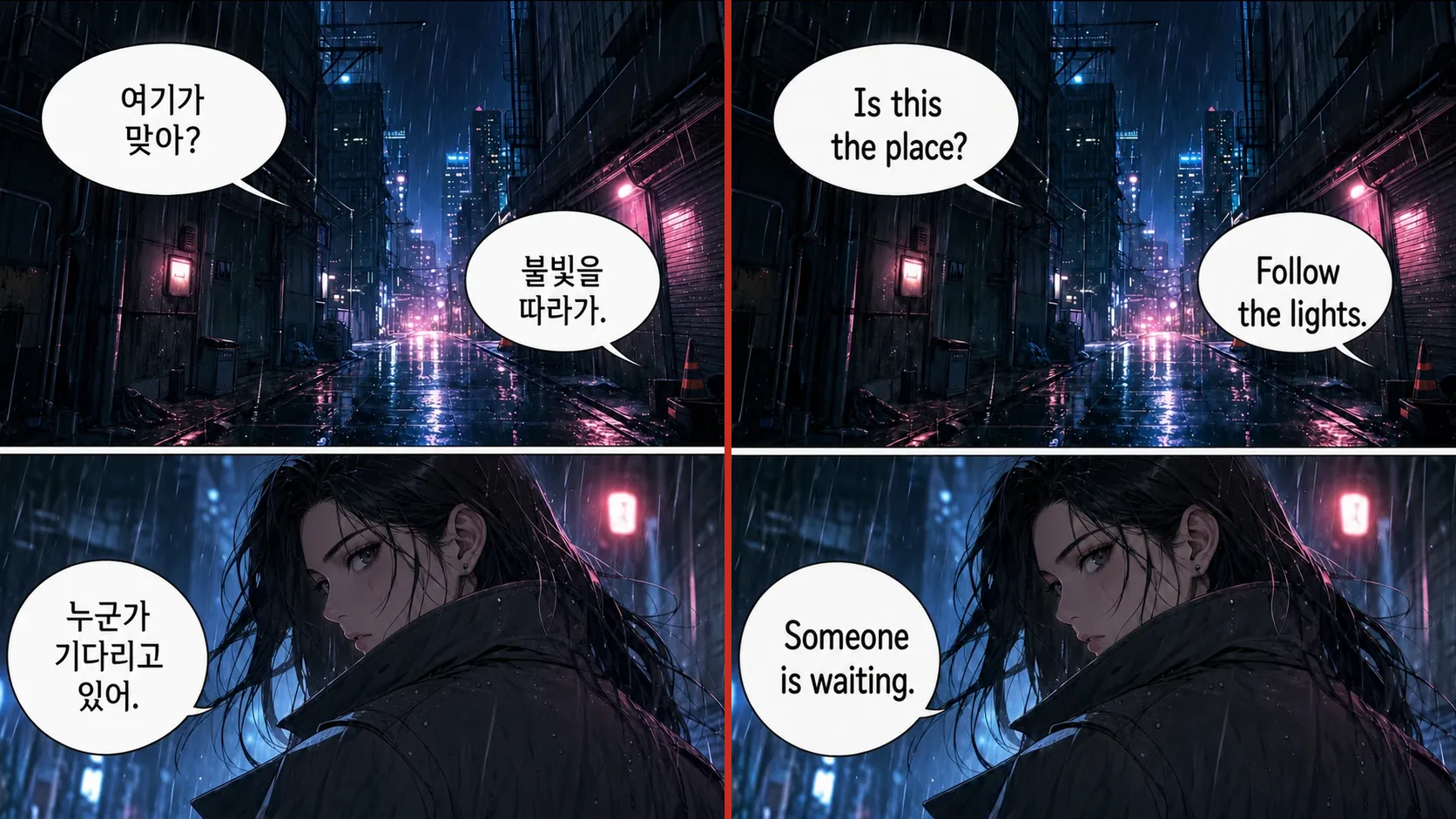
An AI webtoon scanlation tool detects the text in a webtoon image, translates it, erases the original lettering and places the translation back on the artwork in one pass. That covers the repetitive middle of a scanlation job, not the proofreading. If you only want to read, a webtoon translator gives you a readable chapter without cleaning or lettering anything by hand. If you plan to release a translation, treat the output as a first draft and get the rights holder’s permission first.
AI Manga Translator works as a webtoon translator for Korean, Chinese and Japanese pages, with more than 100 reading languages on the website. Pick the route that matches what you have:
- A webtoon open on a website → webtoon translator extension. Translates loaded images in place in Chrome, Edge or Brave, up to 50 at a time.
- One panel or screenshot → manhwa and webtoon translator. One PNG, JPG or WebP up to 15 MB.
- A folder of saved strip segments → batch translator. Up to 20 images per queue, 15 MB each.
- A chapter in a CBZ or ZIP → CBZ translator. Up to 100 MB and 50 images, returned as an ordered archive.
- Clean pages for your own typesetter → text remover. Up to 20 images, with the text removed and nothing translated.
Each page or strip image costs 1 credit, failed pages are refunded, and downloading results requires a purchased credit pack.
What an AI webtoon scanlation tool automates
Scanlation is the fan practice of scanning, translating and re-lettering comics. A traditional team splits the work between a translator, a cleaner, a typesetter and a proofreader. A webtoon scanlation tool compresses the middle steps into one job, but it does not remove every role.
| Scanlation step | Manual team | This AI webtoon translator | Still needs a person |
|---|---|---|---|
| Raws | Finds a sharp source | Nothing; you supply the images | Permission and a clean copy |
| Text detection and OCR | Reads the page by eye | Finds bubbles and captions, reads the text | Spotting text it missed in the art |
| Translation | Writes every line | Drafts every line | Tone, jokes and honorifics |
| Cleaning | Erases and repaints | Erases the original lettering | Inspecting damaged artwork |
| Typesetting | Fits fonts line by line | Letters the translation into the bubbles | Fixing a line; there is no editor after translation |
| Proofreading | Checks the finished chapter | Nothing | The whole step |
The result is a finished image rather than a layered project. On the website tools you can set font, alignment and minimum font size before you translate, but changing a line afterwards means re-lettering it in your own image editor.
WEBTOON Translate shut down: what to use instead
If you searched for webtoon translate, you may be looking for WEBTOON’s official fan translation service. WEBTOON Translate let volunteers translate series for other readers, and it has closed. WEBTOON announced on September 25, 2025 that it would discontinue the service at translate.webtoons.com, with a full shutdown on November 26, 2025 (PT), and said all translation records would be permanently deleted. Only WEBTOON Translate closed; WEBTOON itself is still running.
Three WEBTOON Translate alternatives remain:
- Look for an official edition. In the WEBTOON app, go to My, the three-dot menu, Settings, Options, then Content Language. Not every series exists in every language, and your history, subscriptions and downloads do not carry over between languages.
- Use a webtoon translator on the chapter you are reading, as described in the next section.
- If the series is yours, translate it from your master files and publish the new language yourself.
How to translate a webtoon to English
There are two dependable ways to translate webtoons to English or another language. The right one depends on whether the chapter is on a webpage or saved on your device.
In the browser with the webtoon translator extension
- Install the webtoon translator extension in a Chromium desktop browser and sign in.
- Open the chapter and choose your reading language in the extension popup.
- Scroll to the end of the chapter so every strip image loads. Only loaded images can be picked up.
- Hover over an image and click Translate. For the whole chapter, tick “Translate all manga pages” in the popup, then start it, up to 50 images at a time. Without that box, only the images on screen are translated.
- Read the chapter in place and switch back to the original whenever a line looks wrong.
The hover button is on by default for WEBTOON and Tapas. On Naver Webtoon or any other reader, switch it on for that site from the popup; your choice is remembered per site. Results depend on whether the site lets the browser read its images. If a site blocks that, use a saved image instead. The extension cannot read chapters you cannot already open, and it does not bypass logins or paywalls.
From saved images on any device
- Save the chapter one screen at a time, or export it from your own master file.
- Split very tall images using the rules below.
- Number the files so they stay in reading order.
- Upload them to the single-image translator, the batch translator or, for a zipped chapter, the CBZ translator.
- Choose your reading language. The source language is detected from the image.
- Compare each result with the original, retry anything that failed, then download.
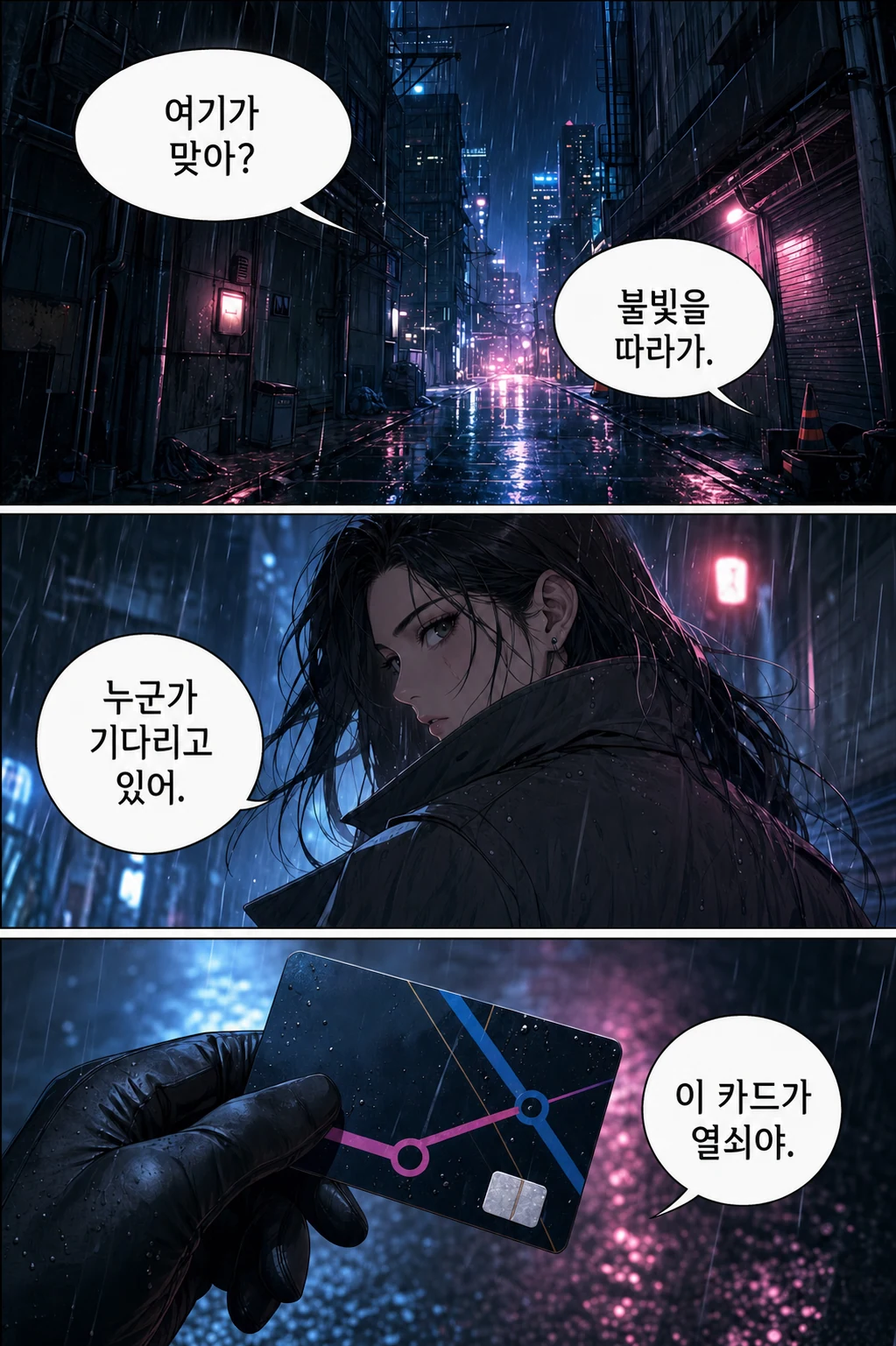
Korean source · check the smallest text
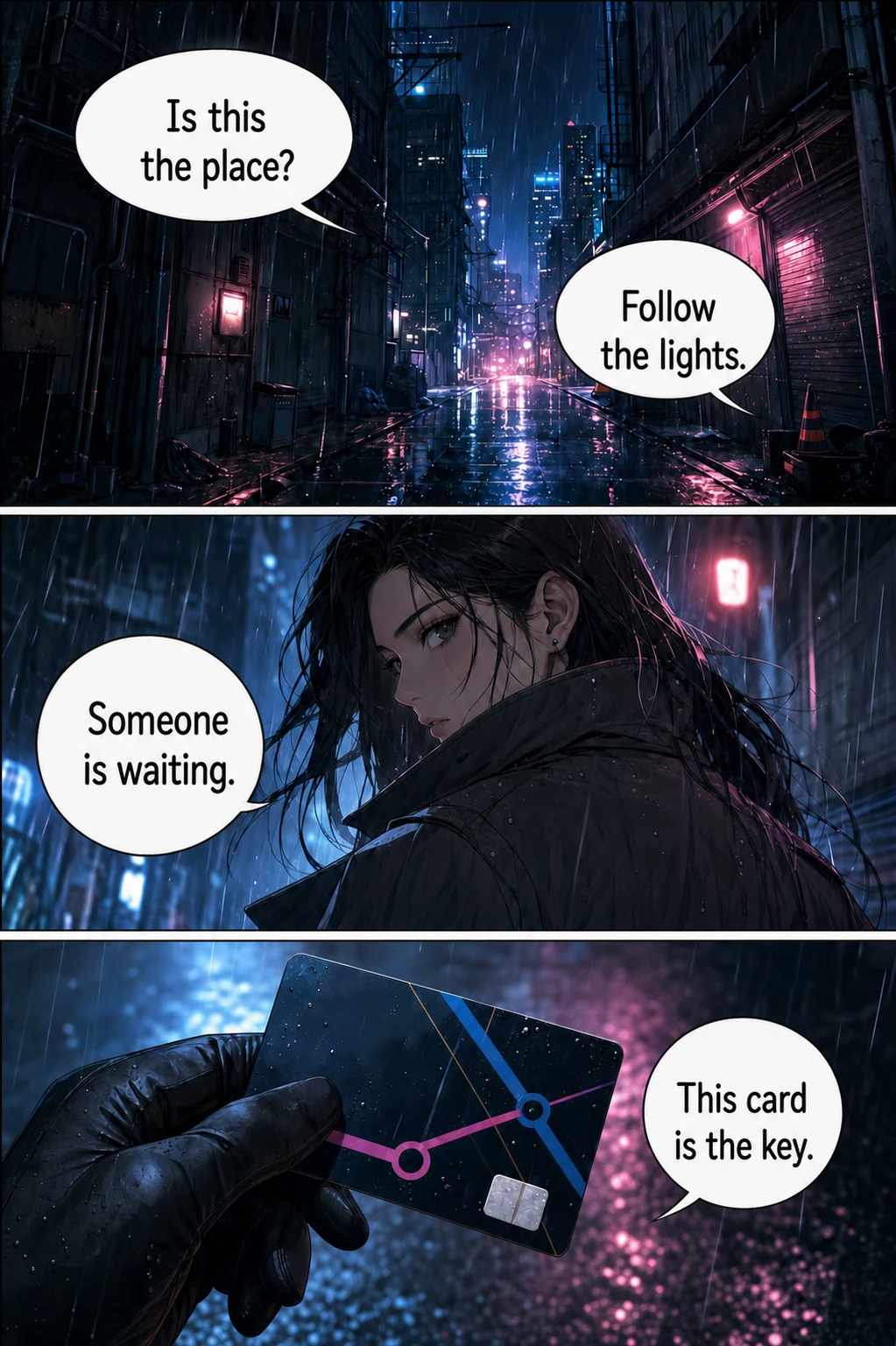
English result · check line fit and meaning
How to split a long webtoon strip
A webtoon is drawn as one long scroll, and that is the main difference between webtoon translation and manga translation. Each saved image counts as one page here, so the way you split a strip affects both quality and cost.
- Cut in the empty gaps between panels. Never cut through a bubble, caption or sound effect. A bubble split in two is read as two fragments and the sentence breaks.
- Keep segments around one screen tall. A very tall image makes the text small relative to the image, which is harder to detect and letter.
- Stay under 15 MB per image. PNG, JPG, JPEG and WebP are accepted.
- Use zero-padded names such as
ep012-001.webpandep012-002.webp, so segment 10 does not sort before segment 2. - Budget credits by segment. Thirty segments cost 30 credits. Fewer segments cost less; more segments keep the lettering larger.
- Test one dialogue-heavy segment first, then run the rest of the chapter.
Translated segments stay separate images, and no step stitches them back into a single strip. To keep a chapter together, use the CBZ route for an ordered archive, or stack the segments in an image editor. For chapters that do not fit one queue, see the whole-chapter guide.
Which webtoon translator fits your job?
The best webtoon translator depends on what you need back. Webtoon translation tools fall into five groups:
| Option | Good for | What you get | Watch out for |
|---|---|---|---|
| Browser page translation | Titles, comments and site menus | Translated web text | Dialogue is part of the image, so it usually stays in Korean |
| Phone image translators such as Google Lens or Papago | The gist of one panel | Text shown over the image | Bubbles are not cleaned and re-lettered |
| AI webtoon translator (this site) | Reading chapters and making a first draft | Re-lettered images | No editor after translation, no shared glossary |
| Open-source desktop projects | Technical users who want local control and editing | Depends on the project | Setup work and your own model or API costs |
| Human translators and letterers | A public release | An edited chapter | Time, budget and rights |
These groups are not mutually exclusive. Many readers use a page translator for the site and an image translator for the art.
Using an AI webtoon scanlation tool in a team workflow
Treat an AI webtoon scanlation tool as the draft stage of a process, not the release stage.
- Confirm the rights before any work starts.
- Write a style sheet outside the tool: names, honorifics, recurring terms and how sound effects will be handled. There is no shared glossary inside the translator.
- Choose your draft. Run the webtoon translator for a re-lettered reading copy your proofreader can mark up, or run the text remover for clean pages your typesetter can letter from a human translation.
- Do the final lettering in your own editor for any line that needs to change.
- Read the finished chapter top to bottom on a phone, because that is how most webtoon readers will see it.
Creators publishing their own series should start from master files rather than compressed copies from a reading site. The text stays sharper, and detection has more to work with.
What to check in a Korean webtoon translation
A Korean webtoon translator has to make choices that English does not force on the original. Check these before you trust a chapter:
- Address terms: hyung, oppa, sunbae and -nim may be kept, translated or dropped, and the choice can vary between segments.
- Names: the romanization can change, because each image is translated separately.
- Sound effects and drawn text: hand-lettered effects may be left in Korean or only partly replaced, so look closely at action scenes.
- Line fit: Korean is compact, so English lines may be lettered smaller than the original.
- Segment edges: check that nothing is repeated or lost where two segments meet.
- Artwork: look at the area around each bubble for smudges or patches.
Is there a free webtoon translator?
Not an unlimited one here. Installing the extension is free, and trial credits for new accounts depend on current account settings. After that, each page or strip image costs 1 credit, failed pages are refunded, and downloading results requires a purchased credit pack. Pricing shows the one-time packs.
If you need no-cost options, the official language edition and a phone image translator are the honest answers. They will not re-letter a page for you, but they are enough to follow a story.
Can you post a translated webtoon?
Only process pages you own or have permission to translate. Translating a chapter does not grant redistribution rights, so posting a translated chapter of someone else’s series needs the rights holder’s permission, whichever tool made it. An AI webtoon scanlation tool changes how fast the work goes, not who owns the work.
Frequently asked questions
What is an AI webtoon scanlation tool?
An AI webtoon scanlation tool automates the middle of a scanlation job: it detects text in a webtoon image, translates it, erases the original lettering and places the translation back on the artwork. Sourcing the pages, proofreading and getting permission to publish remain human jobs.
Is WEBTOON Translate still available?
No. WEBTOON announced on September 25, 2025 that it would discontinue its fan translation service, with a full shutdown on November 26, 2025 (PT). The notice said translation records would be permanently deleted. The WEBTOON reading platform itself was not part of that closure.
How do I translate a webtoon to English?
First check whether an official English edition exists. If not, use the Chrome extension on a chapter open in a desktop browser, or save the strip as images, split it at the gaps between panels and upload it to a webtoon translator. Compare the result with the original before relying on it.
Can I translate a webtoon from its URL?
You can paste an image URL or plain webpage link into the manga URL translator, but readers that load the strip with scripts may return nothing. For those, open the chapter in Chrome, Edge or Brave, scroll so the strip loads, then use the extension to translate up to 50 loaded images at a time. The extension does not open other chapters or bypass logins and paywalls.
Is there a free webtoon translator?
The extension is free to install, but translating uses account credits: 1 credit per page or strip image, with failed pages refunded. Trial credits for new accounts depend on current account settings, and downloading results requires a purchased credit pack, so this is not an unlimited free webtoon translator.
Is there a webtoon translator app for my phone?
There is no separate app, and the extension does not run on mobile browsers. On a phone, save a screenshot and upload it to the website. Saving one screen at a time keeps the text large enough to read.
Will character names stay consistent across a chapter?
Not always. Each image is translated as a separate job and there is no shared glossary, so the romanization of a name or the handling of an honorific can change between segments. Keep a short name list and check it against the chapter.
Can AI replace a scanlation team?
For private reading, an AI webtoon translator can stand in for much of the mechanical work. For a public release it works best as a first draft: a person still needs to check tone, jokes, names, sound effects and artwork, and the release needs the rights holder’s permission.
Start with one strip segment
Pick one dialogue-heavy segment, translate it, and compare it with the original. If the lettering and tone hold up, the same settings will usually suit the rest of the chapter.