
Translate Doujin Free with an AI Doujin Translator
Upload a raw doujinshi page and read it in English or any of 100+ languages, with the dialogue lettered back into the same speech bubbles. New accounts normally get their first page free after Google sign-in, so you can translate doujin free before you decide whether you need more.
Long, confidently detected text outside bubbles may still be translated.
Drop a manga page here
PNG, JPG, JPEG, or WebP, up to 15 MB. The preview stays in your browser until you start the translation.
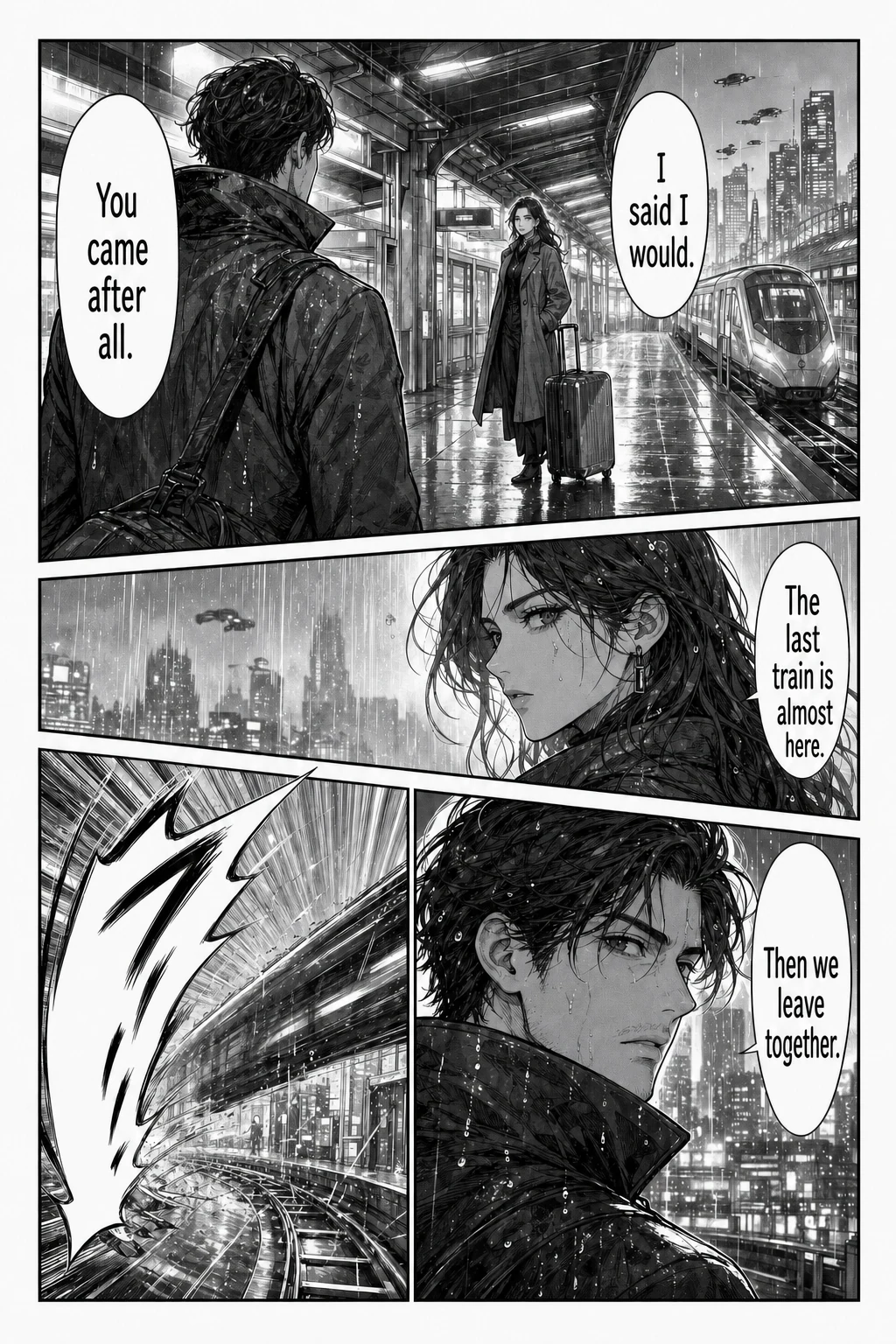
Example translated result
Your translated page appears here
Choose the target language, then start the translation.
Each page costs 1 credit. Failed translations are refunded. Image preview stays in your browser. Sign in is required before the file is sent for processing.
At a glance
The single-page tool in one table: what to upload, what you get back and what it costs.
| Input | One manga page or screenshot in PNG, JPG, JPEG or WebP. No need to crop speech bubbles. |
|---|---|
| Limits | 15 MB per image, one page at a time. For more pages, use the batch or CBZ tool. |
| Output | One translated image with the dialogue placed back on the page. Font and text settings are chosen before you translate. |
| Languages | Japanese manga, Korean manhwa and Chinese manhua pages; 133 reading languages to choose from. |
| Account | Sign-in required. Trial credits for new accounts depend on current account settings; check your balance after signing in. |
| Cost | 1 credit per page. Credits for failed pages are refunded automatically. |
| Downloads | Saving results requires a purchased one-time credit pack. No subscription; purchased credits do not expire. |
A good fit if you
- are stuck on one page or one scene and want to understand it now
- want to test translation quality on a representative page before a whole chapter
- have a screenshot of a manga, manhwa or webtoon panel
Look elsewhere if you need
- a separate text transcript of the dialogue
- editing individual lines after the image is generated
- translating a PDF page directly; export it as an image first
Facts checked against the live product on 2026-10-22.
How to translate doujin free in three steps
You choose how much you are translating. The doujin translator detects the source language from the image, so Japanese pages need no extra setting.
- 01
Choose one page, 20 images or an archive
Use One page for a single PNG, JPG or WebP. Use Up to 20 pages for loose scans, or CBZ or ZIP when the whole book is one archive. Each image can be up to 15 MB.
- 02
Sign in and pick a language
Sign in with Google; new accounts normally receive one free page. English is selected by default, and you can switch to more than 100 reading languages or translate only the text inside speech bubbles.
- 03
Compare, then read on
Each page costs 1 credit, and a failed page returns it. Check the result against the original, then read it online. Downloading images or archives needs a purchased credit pack.
Doujin translator examples
These illustrative Japanese pages show vertical dialogue, detailed inkwork and everyday conversation; the gallery also includes Korean and Chinese pages. Drag the divider to compare the original with the translated page.
Rainy platform
Japanese → English
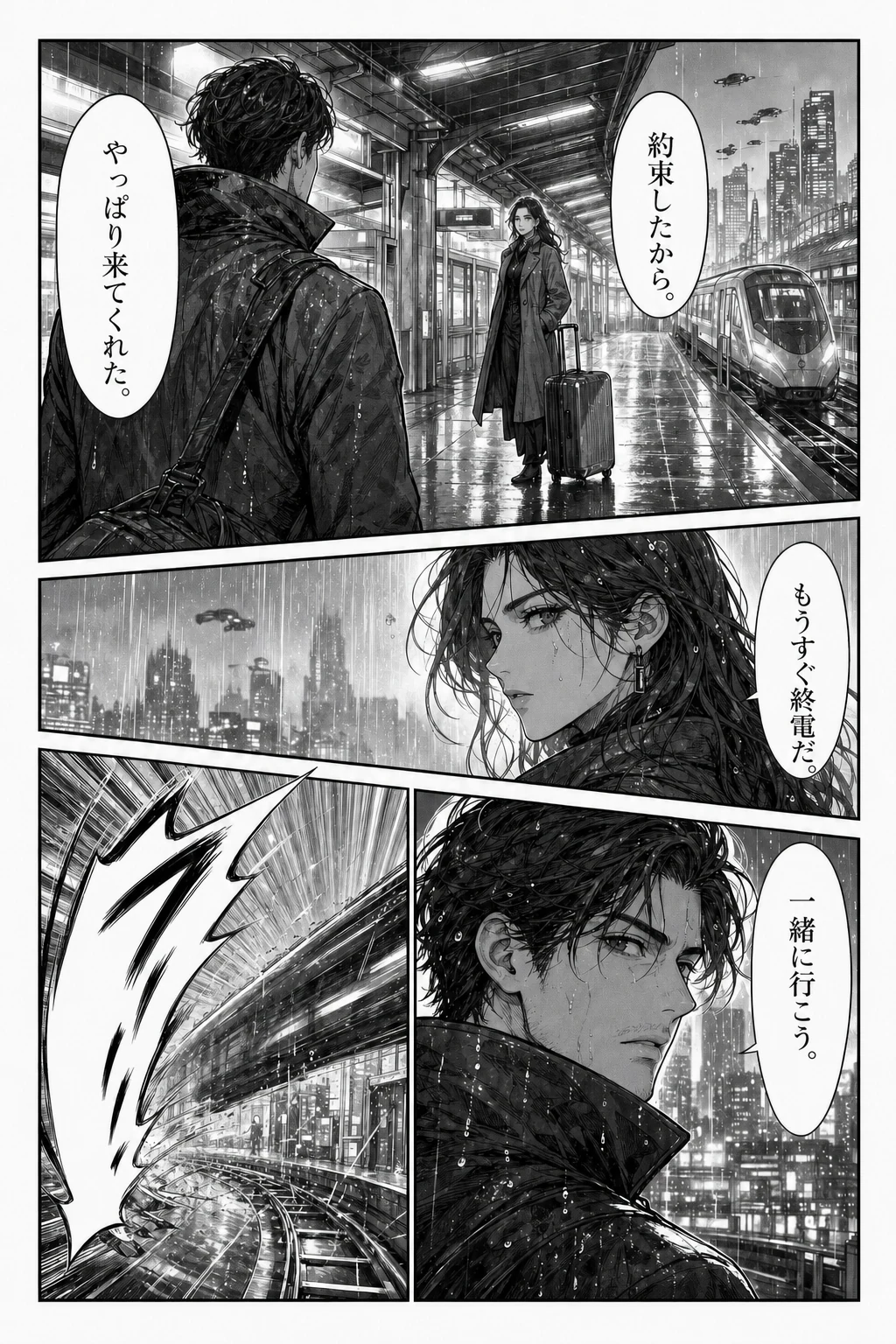
Loading comparison images…
Drag the divider to explore. You can also use the arrow keys.
Illustrative examples, not live translation results. Try your own page to judge the quality.
Translate doujin free: what the free page covers
To translate doujin free, start with the 1 page new accounts normally receive after Google sign-in, with no credit card and no subscription. It runs the same translation as a paid page, so you can test one of your own scans instead of a demo. Before you sign in, the examples on this page are free to compare.
The free page is for reading online: the result stays in your history, but downloads need a purchased credit pack. There is no unlimited plan, so like any free manga translator trial, it is best spent on your hardest scan. Paid packs start at $4.99 as a one-time purchase with no auto-renewal, and their credits never expire, unlike the free page's credit.
A doujin translator for the whole book
A doujinshi is usually a short book, so the page count decides which tool to use. A 24-page doujinshi takes 24 credits whichever route you choose, and a page that fails returns its credit so you can retry it.
This doujinshi translator handles up to 20 images in the Up to 20 pages tab, or one CBZ or ZIP of up to 50 pages in the CBZ or ZIP tab, which keeps every page in order and exports a single archive. For a longer book, split it into archives of 50 pages or fewer. PDF, CBR and EPUB files are not imported directly, so convert them to images or a ZIP first. Keep the tab open while an archive runs, because leaving the page stops the remaining queue.
Japanese to English doujin translator: what to check
Most raw scans work as a quick translate from Japanese to English, but doujin lettering is less regular than commercial manga. Handwritten dialogue, tiny asides and sound effects drawn into the art are the parts most likely to be missed or only partly replaced. Use upright scans at the highest resolution you have, since blurry or heavily compressed pages cause most garbled lines.
Each page is translated separately with no shared glossary, so character names and special terms can change spelling across a book. Japanese also drops subjects, so lines spoken off-panel can get the wrong pronoun. Fan works lean on their source series, which the AI may not recognise, so check names against the original before you share a result.
Doujin translator AI or a human translator?
AI translation for doujinshi suits personal reading: you get a readable page quickly and pay per page. The result is a finished image, not an editable script, and this tool has no text editor after translation.
If you plan to publish a translation, or you are the circle that made the book and want a polished English edition, treat AI as a first pass at most. A human translator and letterer will catch the jokes, character voice and references that tools built to translate doujin with AI tend to flatten.
Doujin means self-published, so check your rights
Doujin means self-published work, and doujinshi covers every genre, from original stories to fan comics based on existing series. Whether a book is original or fan-made, its circle or artist usually keeps rights in it.
Only upload pages you have permission to process, and remember that translating a page does not give you the right to repost it. If you made the book yourself, translating it for overseas readers is the simplest case. Our Terms of Service apply to everything you upload.
Doujin translator FAQ
Can I translate doujin free?
Yes, for your first page. New accounts normally get 1 free page after Google sign-in, and you can read the result online. After that each page costs 1 credit, downloads need a purchased pack, and there is no unlimited free plan.
Can I translate doujin without signing up?
No. Google sign-in is required before a page is sent for translation, which is how the free page is tracked. You can compare the examples on this page without an account to see what a finished result looks like.
How do I translate doujinshi to English?
Upload a clear page or a CBZ/ZIP, keep English as the reading language and start the translation. The Japanese is detected from the image, erased and replaced with English in the same bubbles. Review names and sound effects afterwards.
Can I translate a whole doujinshi at once?
Yes. Use up to 20 images in one queue, or one CBZ or ZIP of up to 50 pages and 100 MB. Each page uses 1 credit, and archive download needs a purchased credit pack.
Is there a doujin translator extension?
Yes. The Chrome extension translates accessible images on the page you are reading, in Chromium desktop browsers, up to 50 images at a time. It is free to install, but translation uses account credits.
Can AI translate doujinshi accurately?
It gives a readable draft, not a guaranteed edition. Results depend on scan quality and lettering, and we publish no accuracy percentage. The best doujin translator AI for you is the one that handles your own scans, so test a difficult page first.
Can it translate a doujin PDF?
Not directly. PDF, CBR and EPUB are not imported, so export the pages as PNG, JPG or WebP images, or package them as a ZIP or CBZ, and upload those instead.
Translate doujin free, starting with your first page
Sign in with Google, upload the page you most want to read and see it in the original layout. Failed pages return their credit.
Translate a page