Pixiv Translate: Manga & Extensions
Learn how to translate manga without AI, use a Pixiv translator extension, and choose a workflow for manga images, tags, and novels.
 AI Manga Translator Team
Looking for pixiv translate options? First check whether you want to read a title, a novel, or words drawn inside a manga image. Those are different jobs. For a strictly manual approach, transcribe the Japanese, draft the English yourself, and check it against the scene. A Pixiv translator extension is an alternative when you want to automate image translation while browsing.
This guide covers both routes, including how to translate manga without AI. You can stop at a reading transcript or go further and create a lettered page. Choose according to your goal, your Japanese knowledge, and whether you are comfortable sending an image to an online service.
Cover: an AI-generated editorial illustration made for this guide.
Pixiv translate: start with the right kind of content
Try selecting a sentence with your cursor. A description or novel may be ordinary webpage text. Dialogue inside a manga page is part of the picture, so translating the surrounding webpage does not necessarily change it. A Pixiv image translator addresses that second job.
| What you want to read | What you are working with | Useful starting point |
|---|---|---|
| Titles, descriptions, and comments | Usually selectable webpage text | Read or copy the text; use webpage translation if automation is acceptable. |
| Tags and artist names | Labels attached to a work or account | Check translated labels or a tag-mapping script; this does not translate dialogue. |
| Pixiv novels | Long-form text | Use a text-reading workflow and preserve paragraph context. |
| Manga speech bubbles and captions | Lettering inside an image | Transcribe manually or use image translation, then review the page. |
A Pixiv novel translator and a Pixiv comic translator therefore solve different problems. Changing the interface language is also a separate action. Pixiv’s official translation-feature help describes selected text in Requests; it is not a promise that every manga image has an English version.
Before doing any work, look for a translation the creator has already shared. Pixiv’s editorial team has also published a selection of translated manga. That is a useful reading option, though it does not cover every work on the platform.
How to translate manga without AI
A non-AI workflow puts the language decisions in your hands. You need enough Japanese to judge grammar and context, or help from a human translator. A dictionary gives possible meanings; it cannot decide which meaning fits the speaker for you.
If your goal is simply to understand a scene, a separate transcript is enough. Cleaning and lettering are optional extra work. Use material you own or have permission to process, and keep the original available for comparison.
1. Read the scene before translating individual bubbles
Follow the panel order and identify who is speaking. Note whether a line is dialogue, narration, a thought, or a sound effect. A short response may depend on the previous panel, and a joke may depend on something mentioned several pages earlier.
2. Transcribe the Japanese and mark uncertainty
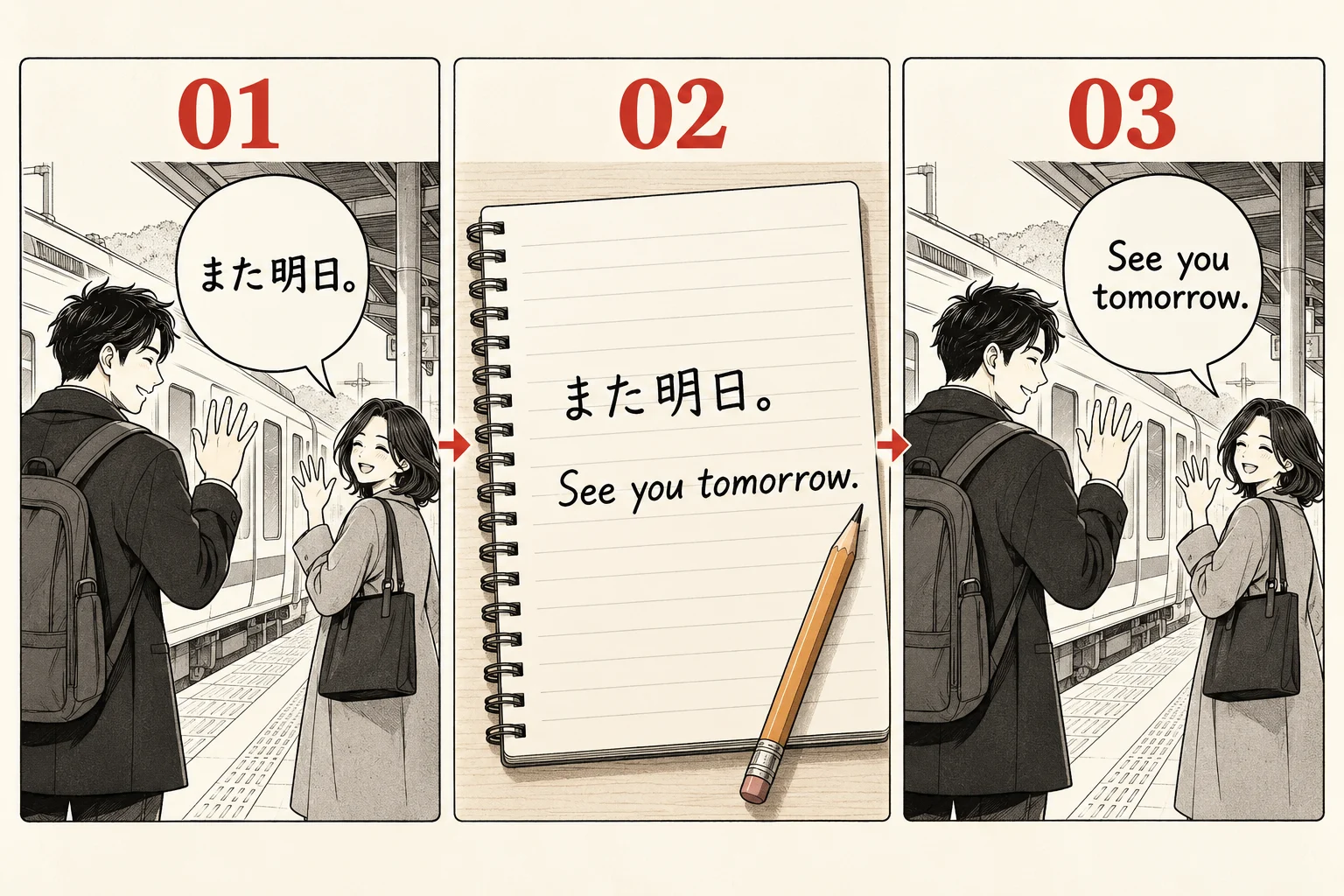
Create a document with page numbers and a line for each bubble. Type the characters yourself, keeping punctuation and small marks. If you cannot read a character, mark it for review instead of guessing. This is the clearest route when “without AI” means avoiding both machine translation and neural OCR.
3. Draft the English with a small glossary
Look up unfamiliar words and check how they function in the sentence. Keep recurring names, places, honorific choices, and sound effects in a glossary. Write an English line that communicates the meaning in that scene, then compare it with the Japanese. Mark unresolved phrases so they do not disappear into a polished-looking draft.
4. Keep the transcript, or prepare a lettered copy
For a reading transcript, preserve your page and bubble labels and skip to proofreading. For a finished image, duplicate the original in an editor such as GIMP. Keep the source layer untouched, cover plain bubble interiors on a separate layer, and manually repair any lettering that crosses the artwork. A clone brush copies nearby pixels; it does not recover an unseen original drawing.
5. Add editable text layers
Place each translated line on its own text layer. Leave breathing room around the lettering, break lines where the phrase naturally pauses, and keep the text inside the bubble. Save an editable project before exporting a reading copy. GIMP’s text-tool documentation and clone-tool guide explain those controls.
6. Check meaning, then reading flow
First compare the translation with the Japanese and artwork. Next read the English alone: does the speaker sound consistent, does the conversation make sense, and does each line fit? Fix the glossary when you change a recurring term. A professional translator’s account of their manga translation process is a useful reference for separating drafting, editing, and proofreading.
That is how to translate manga without AI while keeping a trail of your decisions. It takes language work and review; an offline app or a free translator is not automatically a substitute for either.
How to use a Pixiv translator extension
If you are comfortable with AI-assisted translation, an extension can reduce the repeated saving and uploading. Our manga translation extension is configured for Pixiv and processes image content. It uses your website account and sends the selected image to an online service.
- Install and pin the extension. Open the extension page, follow its Chrome Web Store link, and pin the extension in a compatible desktop browser.
- Sign in on this website in the same browser. Check your available credits before starting. Installing the extension alone does not sign you in.
- Open the Pixiv work and load the page image. Expand the viewer and let the image finish loading. Tiny gallery thumbnails are poor translation inputs.
- Choose the target language. Open the toolbar popup and select English, or another supported output language. Check that the site’s Translate button is enabled if you want to use the hover control.
- Translate one representative page. Hover over the image and use Translate, or try the image’s right-click translation command. Wait for the returned image, then switch back to the original to check important lines.
- Expand to a batch after checking the result. The popup can select eligible images on screen or all eligible images currently loaded in that page. The current cap is 50 images per batch, not an automatic crawl of the artist’s collection.
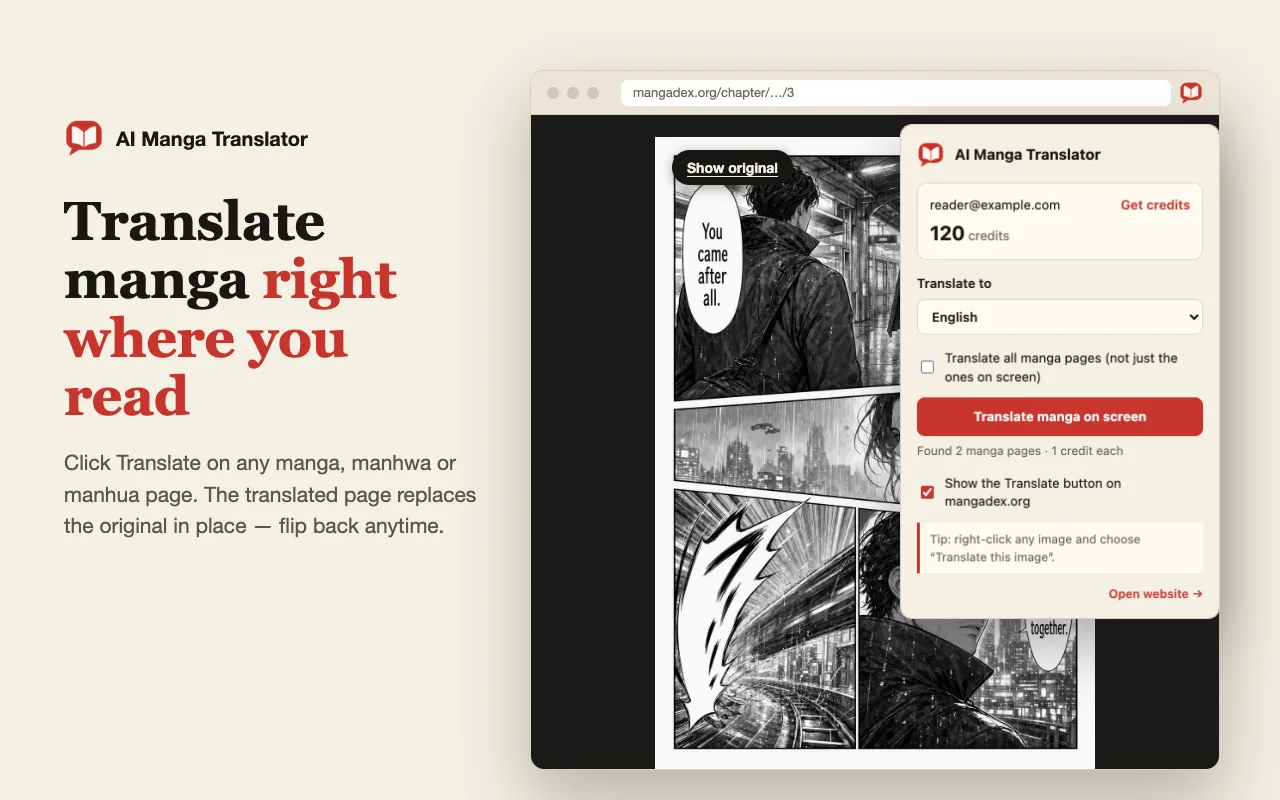
This Pixiv translate route saves manual file-handling steps. It does not remove the need to check names, reading order, small captions, or emotional tone. “No manual download” also does not mean “no upload”: the image still leaves your browser for processing. The source and result are saved in account history; review the privacy policy before submitting private material.
Choose a Pixiv translate method for your reading goal
Use the manual route if controlling every translation decision matters most. Use text translation for actual webpage text. Use an image translator when the words are embedded in artwork and you accept automated processing.
| Method | Your work | Image handling | Main limitation |
|---|---|---|---|
| Manual translation | Transcribe, research, draft, and proofread | Can stay local with a local editor and files | Requires language knowledge; lettering takes extra work. |
| Webpage text translation | Check translated descriptions or novel paragraphs | Does not by itself rewrite words embedded in pictures | Not a strictly non-AI alternative; check the chosen service. |
| Our image extension | Select language and pages, then review | Sends selected images for online processing | Requires sign-in and credits; only eligible loaded images are included. |
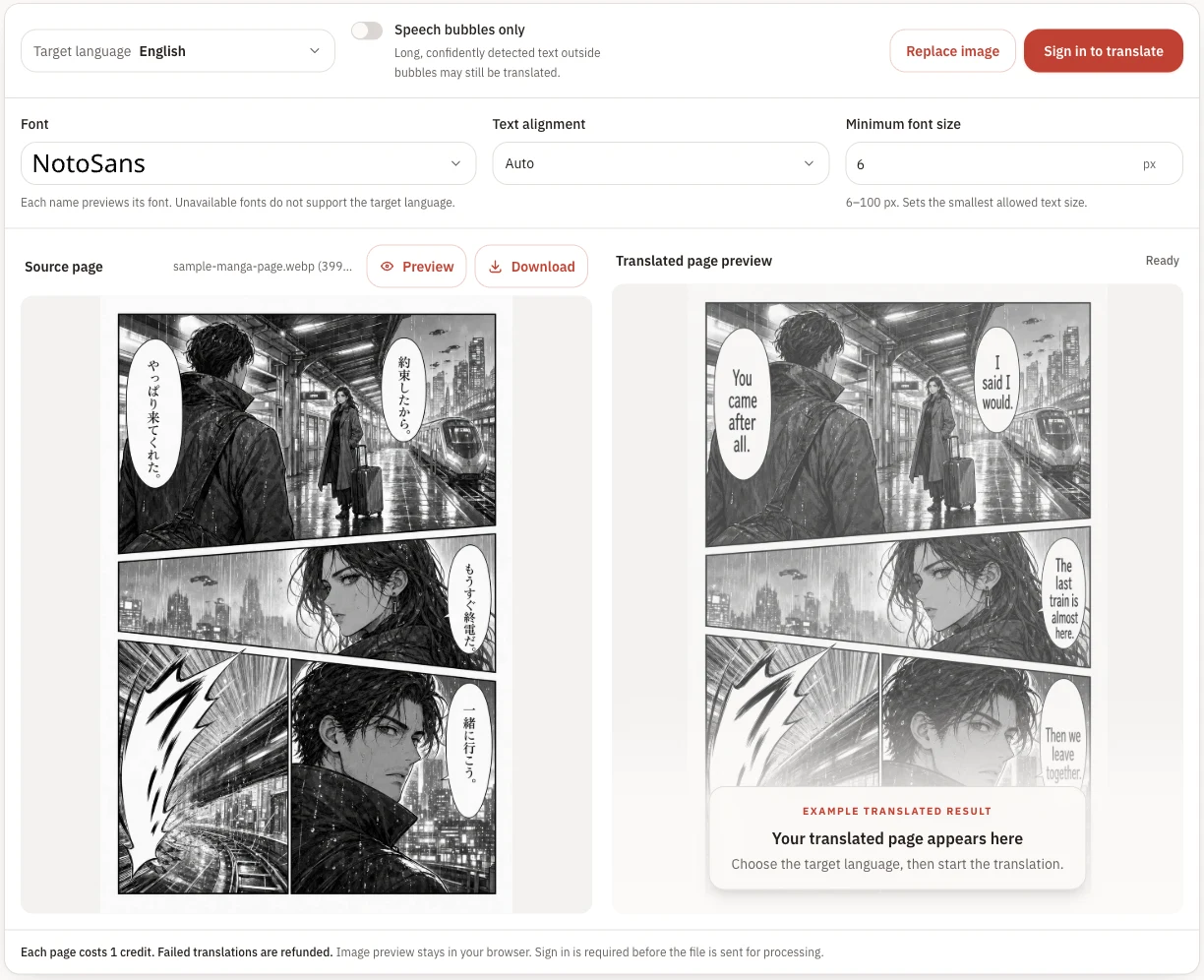
A Pixiv manga translator is most useful when it fits the content you actually have. For one saved image, the single-page manga translator accepts PNG, JPG, JPEG, or WebP up to 15 MB. It takes a file, rather than importing a Pixiv artwork URL.
What can you translate for free?
The manual method can use a free dictionary, a text document, and GIMP. You are supplying the translation work yourself. If you need a human translator or editor to do that work, discuss the scope and cost with them.
Our extension is free to install. Online translation requires an account and sufficient credits, and free-account limits depend on the current configuration. Check your account and current pricing before a large batch. A claim such as “free with no limit” should not be inferred from a free extension download.
Missing text, login problems, and long chapters
The webpage changes language, but the bubbles stay Japanese. You are probably translating page text rather than the image. Revisit the content table above and choose the manual or image workflow.
A vertical or handwritten line is missing. Inspect the original at full size. Compression, tiny characters, or unusual lettering may prevent recognition. Use a clearer source and check the line manually; repeating the same request does not guarantee a correction.
Translation sends you back to a login screen. Keep the original Pixiv page open in your signed-in browser. A separate URL translation service may not have your browsing session. Our extension also needs a separate sign-in on this website; those two accounts serve different purposes.
Only some pages appear in the batch. Scroll or open the viewer to load the pages you intend to translate, then check the popup count. “All” means eligible loaded images, not every chapter behind links. Process larger sets in manageable groups.
The English sounds fluent but wrong. Check the previous bubble, the speaker, and repeated names. For long sequences, maintain a glossary and compare pages together. If you already have page files, our chapter translation guide explains the file-based workflow.
Frequently asked questions
What does “Pixiv translate” actually translate?
That depends on the method. A tag translator handles labels; webpage translation handles selectable text such as descriptions and novels; an image translator processes words drawn inside a manga page. Check which kind of content you are looking at before choosing a tool.
How do I translate raw manga to English without AI?
Transcribe the Japanese yourself, use dictionaries and the surrounding scene to write a translation, then proofread it. If you want a lettered image, erase the original lettering manually on a copy and add your translation on separate text layers. Skip neural OCR and automatic translation for a strictly non-AI process.
Can I translate Pixiv manga without saving every image first?
A compatible image translation extension can submit an image directly from the page you are viewing. This avoids manually saving and uploading each file, but our extension still sends that image to an online translation service. It does not translate offline.
Can a Pixiv translator extension translate an entire collection?
Our extension works with eligible images already loaded in the current page, with a maximum of 50 images per batch. It does not import an entire Pixiv collection from a URL or automatically open every work. Load and check the pages you want before starting a batch.
Can I use a Pixiv manga translator for free?
You can do the manual work with free tools such as a dictionary and GIMP. Our extension is free to install, but starting an online translation requires a signed-in account and sufficient credits. Free-account limits can change; check your account and the current pricing page. Free installation does not mean unlimited translations.
Will a Pixiv tag translator translate speech bubbles?
A tag-mapping script changes labels or artist names. It does not, by itself, recognize dialogue embedded in manga images. For speech bubbles, use a manual image workflow or an image translation tool.
Why are vertical or handwritten lines missed?
Small characters, stylized handwriting, overlapping artwork, and vertical layouts can make text recognition unreliable. Use a clear, fully loaded image and check the missing line against the original. A fluent result is not proof that every bubble was recognized correctly.
Is offline OCR a way to avoid AI?
Offline describes where software runs, not how it recognizes text. Some OCR engines use neural networks; Tesseract 4 and later include an LSTM-based engine. If avoiding all AI is your requirement, transcribe by hand rather than assuming an offline OCR app is non-AI.
Build your Pixiv translate routine
Start with one short scene. Choose manual transcription if avoiding AI is the priority; use an extension if reducing repetitive image handling is the priority. Compare the result with the original before moving to a longer chapter.
For how to translate Pixiv to English, the key decision is the same: match the method to the text or image in front of you. Continue with the extension installation guide or our Japanese manga image tutorial when you are ready for the automated route.
Technical reference:
Tesseract’s official documentation
explains its neural-network OCR engine. Tool capabilities in this guide were checked against this website’s implementation on September 30, 2026.